


Rachel Buckman - Sr. Learning & Support Coordinator
Chava Tzemach - Director of Marketing and Communications
Chava Tzemach - Director of Marketing and Communications
Sefaria for Google Docs
Sefaria for Google Docs is an extension that integrates Sefaria's 300+ million-word library into the Google document editor, making writing and sharing Torah even easier than before.
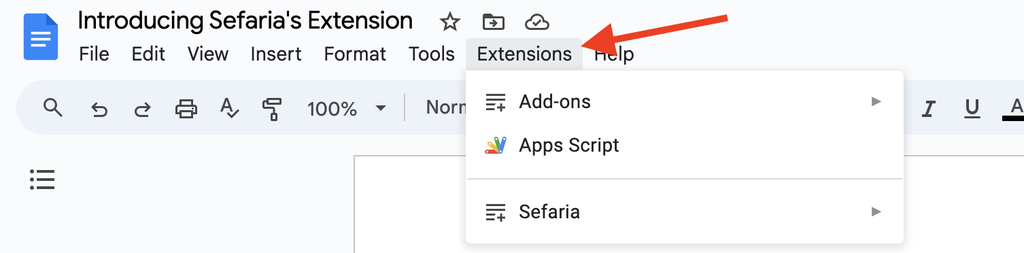
To use the extension in a Google Doc:
- In the toolbar at the top of your Google Doc, click on ‘Extensions’.
- Hover your mouse over ‘Sefaria’ to view all Sefaria extension tools.
New Source Sheet Editor
Making source sheets on Sefaria is easy and allows creators to draw together a wide variety of sources, across media, and create a shareable digital document.
Features of the new editor
- Edit and read in the same view - No need to switch between edit mode and library view.
- Add content anywhere on the sheet - No need to use modules.
- Save automatically - All sheets are saved automatically. No need to press a "Save" button.
Enabling the new editor
To use the new version of the editor, click this link. Once you click the link, you will have enabled the new editor and won't need to do it again.
Instructions for the new editor can be found on Making a Source Sheet on the New Editor.
Instructions for the new editor can be found on Making a Source Sheet on the New Editor.
Help and Feedback
- The Help Center provides instructions for using the Sefaria library and related tools.
- Write to us with questions and feedback at [email protected]